Here’s How to Delete Everything That Google Knows About You
Here’s How to Download and Delete What Google Knows About You
By Daniel Howley
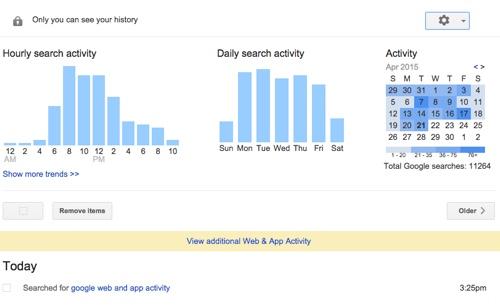
Have you ever wondered what Google Search really knows about you? Well, now you can check, as Google has added a new feature that lets you view and download your entire search history.
Yep. Everything.
The feature, which was spotted by the unofficial Google Operating System Blog — though VentureBeat points out that the function was made available in January — gives you access to everything from what you searched for to the links you clicked on from those searches. It also shows you the addresses you’ve searched for.
I was even able to see the list of images I clicked on while searching for pictures of cats eating spaghetti. Now imagine what you’ve looked for. Oh, and clearing your browser history won’t delete this data.
But there’s no reason to panic, because in addition to being able to download your search history, you can clear it.
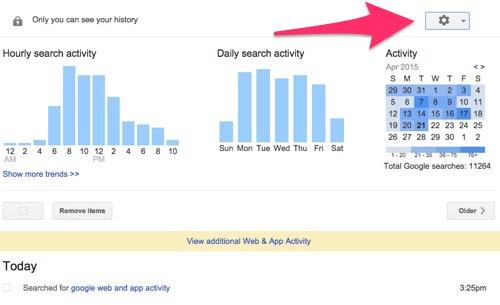
2. Next, click the gear icon in the top-right corner of the screen.
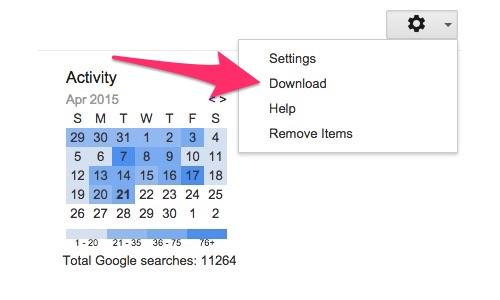
3. Then select Download from the drop-down menu.
You’ll then receive a pop-up window warning you not to download your search history to a public computer, as it contains a large amount of sensitive information.
4. If you want to continue, click CreateArchive.
Once your history is downloaded, you’ll receive a link in a few seconds that lets you view your data.
If you don’t want to download your data, and would rather get rid of it, you can do that as well. Of course, there are some reasons to let Google keep your search data. For one thing, it guarantees faster search results. It also ensures that Google Now has all of the latest relevant information about you. If you delete your data, your searches won’t be as tailored to your habits.
Still want to get rid of your search history? Here’s how:
Before we get started, it’s worth pointing out that if you want to keep your information hidden, you can use your browser’s privacy option, which keeps Google from saving your data — though it can still be seen by your service provider or employer.
Simply deleting you browser history won’t clear the data saved by Google, as you’re only deleting the information stored by your browser and not what’s on Google’s servers. To do that, you’ll have to:
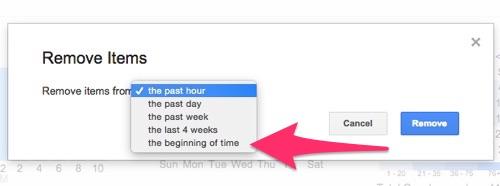
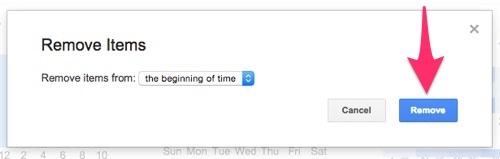
2. Select Remove Items and choose the beginning of time from the drop-down menu.
3.Click Remove and kiss your data goodbye.
That’s it. All of your search history will be deleted, and you’ll never have to worry about Google knowing about the time you looked for tickets to a Justin Bieber concert.
Author
April 23, 2015 at 11:18 AM
Viewing 1 post (of 1 total)
You must be logged in to reply to this topic.
The information on this site has been included in good faith for general informational purposes only. It is not intended to amount to advice on which you should rely, and we give no representation, warranty, or guarantee, whether express or implied as to its accuracy or completeness. You must obtain professional or specialist advice before taking, or refraining from, any action based on the content on our site.
















 .
.





 .
.